EN

Chains and multi-store

Many counters, several countries, one back office.

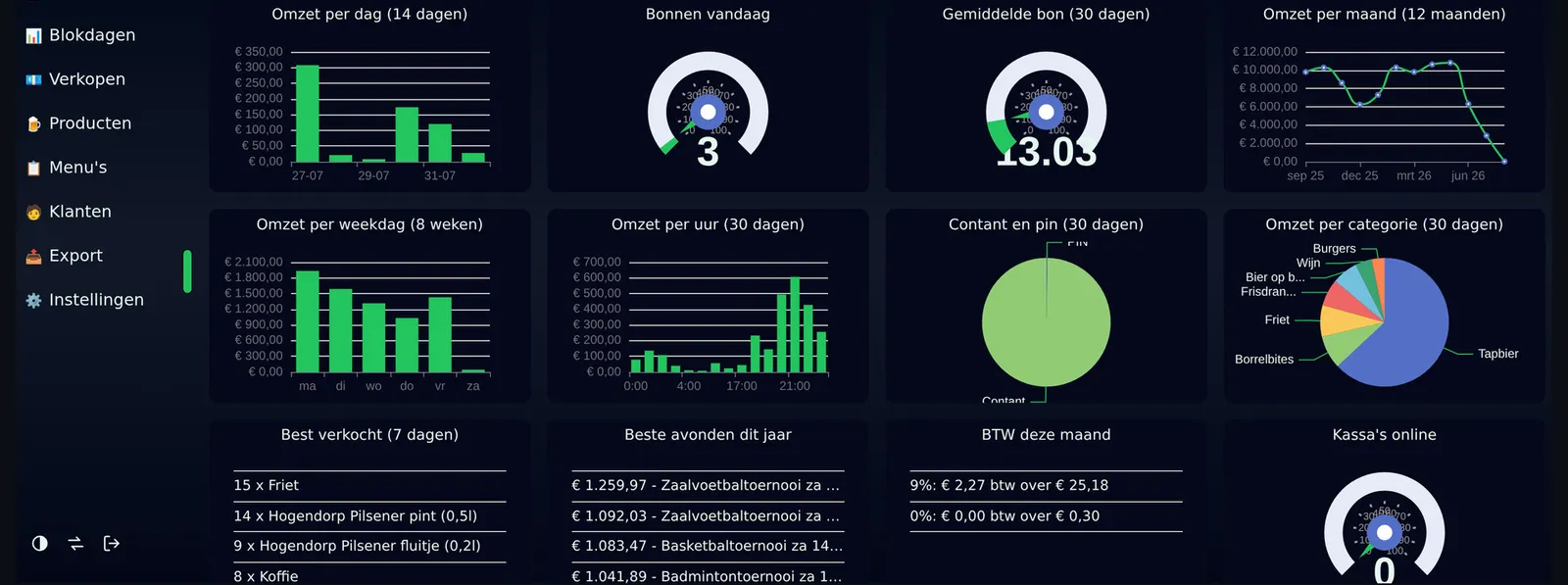
Stores that each have their own assortment, prices, currency and tax rules, and a head office that wants one set of numbers. Roles decide who sees which store, and a till centre shows every counter live.
Many counters, several countries, one back office.

Three things that go differently

Each store its own, the chain as one

Own assortment, own prices, own pay methods per store, and one catalogue and one report over all of them.

Who sees which store is a setting

A cashier sees their own shop, a manager their region, head office everything. Roles decide sections, scope decides stores, and both are checked on the route and not only in the menu.

Every till, live, on one screen

Which counter is up, which version it runs, which business day it is on, and a command to reboot or swap screens when something is stuck.

Recognise your counter in this? An intake tells you what it really takes, and what it costs.

What the engine brings to this counter

Not a feature list written for this page. These are the parts of Phlo POS that carry this kind of counter, and they run today.

Retail

Shops, counters and chains.

  • Barcode scanning with no focus fiddling, and a price checker on the lock screen
  • Staff sign in with a badge; staff discount follows the person across every store
  • Gift cards: sell, redeem and report, including cards issued long before we arrived
  • Customers on account, scoped so a till only offers the debtors that belong to it
  • Its own assortment per store, so the same barcode scans the same offline as online
  • Receipt numbers per till per business day, and receipt lookup by number

Back office

One place for master data, and the numbers a head office asks for.

  • Dashboard with turnover, busy hours, top sellers and payment mix, per store the viewer may see
  • Day and period reports per store, per cashier, per receipt, with tax per rate
  • Products, menus, buttons, prices and assortments managed from the back office
  • Roles from cashier to head office, and a store scope that decides who sees which store
  • A till centre showing every till live, with its version and its day
  • Links to what you already run: bookkeeping exports, loyalty programmes, and older databases you cannot replace overnight

Running them, and keeping them running

A till is not delivered once. It is looked after.

  • Every till boots from the same image and asks which back office it belongs to; nothing is configured per machine
  • Taking a till into service is what revokes the old one, so a replaced machine in the stockroom stops receiving receipts
  • Reboot, shut down and swap screens from the back office, never during an open day, and every command is written down
  • The agent updates itself from a release the back office puts out, and reports the version it is running
  • A report button on till and back office that sends a screenshot with the circumstances, and a thread to follow it

What you want to know before you start

Can stores run different currencies?

Yes. Amounts are held in the store currency, foreign cash records what was physically handed over at the rate of the day, and reporting adds up per country rather than pretending three currencies are one number.

Can we migrate the history of our old system?

That is how the largest installation started: years of receipts, gift cards and debtors came across and reconcile to the cent with the system they came from.

What about our bookkeeping and loyalty programme?

Both are connectors. A chain's own exports and loyalty rules live in its own layer, on top of the shared engine.

What does a Phlo POS project cost?

A custom till has no list price, because the scope decides it. After an intake you get one price for the whole project: build, hardware advice, installation and training in a single amount, agreed before we start.

Ready to look at it properly?

What would your counter need?

Tell us how you sell today and what gets in the way. You get a fixed scope and a fixed price, or an honest no.

What an intake looks like

Counter
Bar with a kitchen, two screens
Today
A till that stops when the line drops
Hardware
Existing touchscreen and printer

You hear back from the people who would build it, not from a sales desk.

We use essential cookies to make this site work. With your permission we also use analytics to improve the site.

Wondering what your counter needs?

Start an intake